Reviewed · TOKYO TOURS
Japan: eSIM with Unlimited Local 4G/5G Data
Japan runs on good information. A working phone helps. This eSIM gives you unlimited local 4G and 5G data without hunting for a SIM shop after landing, and I like the quick QR-code setup and strong KDDI coverage. I also like having two choices: the full-speed Ultra plan or the cheaper Lite plan capped at 10 Mbps.
The main catch is timing. The eSIM QR code arrives separately by email one day before your activity date, not inside the booking voucher. You also need an unlocked, eSIM-compatible phone, and the plan counts usage by Japanese calendar days, so activating at 10 PM still uses one full day.
In This Review
- Key points to know before buying
- What this Japan eSIM actually gives you
- Ultra or Lite: which plan fits your trip?
- Installing the QR code before you fly
- Connecting after arrival in Japan
- Coverage, speed, and the subway question
- Sharing data with another phone
- What you can do with data only
- Price and overall value at $10
- Who should choose this eSIM?
- My booking advice before you pay
- Should you book this Japan eSIM?
- FAQ
- Does this eSIM include a Japanese phone number?
- How do I check if my phone supports eSIM?
- When will I receive the eSIM QR code?
- Does the eSIM work before I arrive in Japan?
- What is the difference between Ultra and Lite?
- Can I share the eSIM data through a hotspot?
Key points to know before buying
- KDDI au network: The eSIM connects to KDDI’s local 4G and 5G network throughout Japan.
- Two speed choices: Ultra has unthrottled data, while Lite has unlimited data capped at 10 Mbps.
- No physical SIM needed: You install the plan by scanning a QR code sent by email.
- Hotspot is limited: Tethering is supported, but the available hotspot allowance depends on the plan and duration.
- No phone calls or SMS: This is a data-only eSIM, so you use apps for messaging and calling.
- Check your phone first: Dial #06# and confirm that an EID appears before purchasing.
What this Japan eSIM actually gives you
This is a mobile data plan for use in Japan. It does not provide a Japanese phone number, voice calls, or SMS messaging. In practical terms, you get internet access for maps, translation tools, train information, restaurant searches, email, messaging apps, and other online services.
The plan operates on KDDI au, one of Japan’s major mobile networks. It covers Japan, including the main island of Honshu listed for this experience. The exact signal you receive depends on your surroundings. You might see 5G in open areas and 4G indoors, underground, or in crowded places.
That switch is normal. A 4G connection is still perfectly useful for most holiday tasks. Sending messages, checking a map, translating a menu, or looking up a train platform does not require the fastest possible connection.
The word unlimited needs a little explanation. For the Ultra option, the supplied specifications describe unlimited 5G and 4G local data with no throttling. For Lite, the data remains unlimited, but the maximum speed is 10 Mbps. That is enough for normal phone use, but it is not the best choice if you plan to download large files or use your phone as a heavy-duty internet connection.
At $10 per person, the value is strongest for anyone who wants simple access without swapping a physical SIM card. The price is also easier to justify if you need data from the moment you arrive, when airport Wi-Fi or hotel Wi-Fi may not yet be convenient.
A few more Tokyo experiences worth weighing up
- Mt Fuji and Hakone 1-Day Bus Tour Return by Bullet Train
★ 5.0 · 26,383 reviews - 1-Day Tokyo Bus Tour
★ 5.0 · 14,250 reviews - Tokyo: TOKYO SKYTREE® Admission ticket
★ 4.5 · 11,192 reviews
Ultra or Lite: which plan fits your trip?
The Ultra plan is the better pick if you want the fastest available local data and fewer limits. It offers unlimited 5G and 4G data without throttling and is available for plans lasting from 3 to 30 days.
That longer range matters. A two-week Japan trip, a month-long stay, or a multi-city visit can all fit within the available Ultra duration choices. If you expect to use cloud storage, stream video, share your connection, or rely heavily on online services, Ultra gives you more breathing room.
The Lite plan offers unlimited 5G and 4G data at a maximum speed of 10 Mbps. It is available for 3 to 10 days. For a short visit, this may be all you need. Google Maps, translation, messaging, web browsing, and normal social media use should not demand more speed.
Lite is also a sensible choice if you mainly want your phone ready for practical tasks. You can save the faster option for people who know they will push their connection harder.
One detail deserves attention: the plan duration is calculated by calendar days from your first connection to the KDDI network in Japan. If you activate at 10 PM, that day counts as a full day until midnight. I would avoid connecting at the airport late at night if your plan starts that evening and your phone can wait until morning.
The QR code must be installed and activated within 30 days of purchase. This gives you some planning room, but it does not mean you can buy it now and activate it months later.
Installing the QR code before you fly
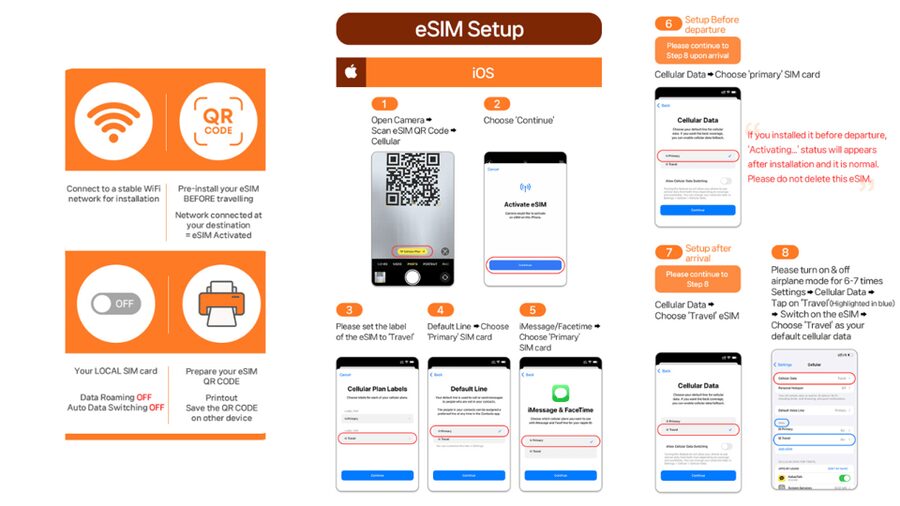
The setup is simple in theory, but the timing can catch you off guard. You receive a QR code by email one day before the activity date. The QR code printed on the GetYourGuide voucher is not the eSIM installation code.
That distinction is important. Save the separate email, keep it easy to find, and do not assume the booking voucher contains everything needed. You may want to take a screenshot of the code or keep the email available on another device, though the supplied instructions specifically direct you to scan the code.
Before purchase, check two things:
- Your phone supports eSIM.
- Your phone is unlocked for a foreign SIM or eSIM.
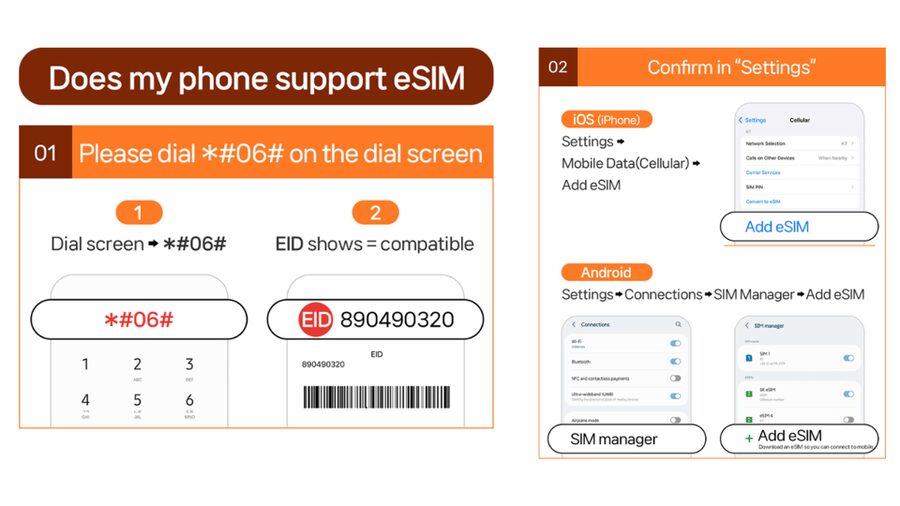
The quickest compatibility check is to open the phone dialer and enter #06#. If an EID appears, the phone has an eSIM identifier. If no EID appears, the phone is not compatible with this service according to the supplied instructions.
An EID alone is not the whole story. Your phone also needs to be unlocked. A locked phone may reject a foreign eSIM even if the hardware supports one. Check this before paying, since refunds are not accepted after the eSIM QR code has been sent.
Connecting after arrival in Japan
The eSIM connects to the local network after you arrive in Japan. You can install the eSIM ahead of time, but do not expect it to provide Japanese data while you are still at home.
Once in Japan, your phone should connect to KDDI au. The first connection starts the calendar-day clock for your chosen plan. This is why arrival time matters more than many people expect.
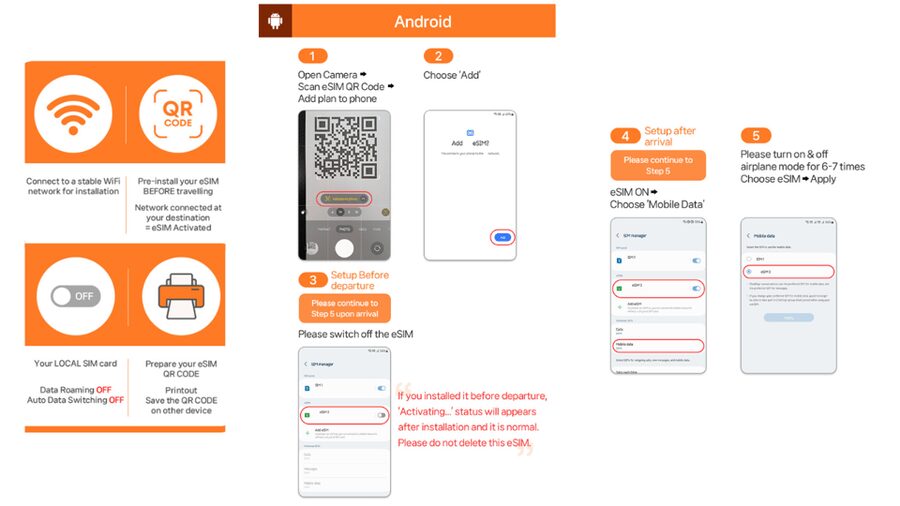
If the QR code produces an invalid message, do not immediately assume the eSIM has failed. The instructions advise checking your phone’s SIM settings to see if a new eSIM has already appeared.
On an iPhone, look under Settings, then Cellular. On an Android phone, go to Settings, Connections, and SIM Manager. If the new eSIM appears there, it may simply need to be selected or enabled.
For technical trouble, the supplier provides an email address and WhatsApp contact. Keep those details available before you leave Wi-Fi, since troubleshooting is much easier when you still have another way to get online.
A completely different kind of day out in Tokyo:
- Tokyo: teamLab Planets TOKYO Digital Art Museum Entry Ticket
★ 4.6 · 9,779 reviews - Mt Fuji & Hakone Cruise, Drum Show Bullet Train 1 Day from Tokyo
★ 4.0 · 7,413 reviews - Tokyo: Sumo Show Experience with Chicken Hot Pot and a Photo
★ 4.8 · 6,678 reviews - Tokyo: Shinjuku Food Tour (13 Dishes at 4 Local Eateries)
★ 5.0 · 6,603 reviews
Coverage, speed, and the subway question
The most encouraging practical detail is that the connection has worked across many locations, including subway use, according to one five-star experience. That is useful in Japan, where you may be moving between stations, checking route changes, and trying to find the correct exit in a large underground complex.
Still, subway coverage should not be treated as a guarantee for every tunnel or station. Underground signal can vary, and the information specifically warns that location can affect 5G. Indoors, below ground, and in crowded areas, your phone may drop to 4G.
That is not a serious weakness for ordinary sightseeing. In fact, reliable 4G is often more useful than a patchy 5G signal. I would judge this plan by whether it keeps maps and messages working, not by whether the 5G icon appears every minute.
The Lite plan’s 10 Mbps ceiling is worth considering here. It should handle navigation, translation, messaging, and browsing comfortably. Ultra makes more sense if you want maximum speed, frequent video use, or a connection that can serve demanding tasks.
Sharing data with another phone
Hotspot sharing is supported, but it comes with limits. The available hotspot allowance is listed as follows:
- 3-day plan: 3 GB
- 4-day plan: 3 GB
- 5-day plan: 4 GB
- 6-day plan: 5 GB
- 7-day plan: 6 GB
- 8-day plan: 7 GB
- 9-day plan: 8 GB
- 10-day plan: 9 GB
- 15-day plan: 15 GB
- 20-day plan: 19 GB
- 30-day plan: 30 GB
These figures apply to hotspot sharing, not the main phone’s local data allowance. Your own device still receives unlimited data under the selected plan, but tethering is subject to the listed allowance.
This makes the eSIM a good fit for couples or families who need occasional shared access. One person could provide directions or a quick connection for another phone. It is less suitable as a permanent replacement for hotel internet for several people, especially if you plan to stream heavily.
One five-star experience specifically praised the ability to share the connection with other phones and found coverage strong. That is a useful benefit, but I would still monitor your hotspot use so the limited tethering allowance does not disappear early.
What you can do with data only
A data-only plan works well in Japan because many daily travel tools do not require a phone number. You can use internet-based messaging, online maps, translation apps, booking apps, email, and web searches.
You can also make calls through data-based services, but standard voice calls and SMS are not included. If a business needs to send a text-message confirmation to a Japanese number, this eSIM will not provide that number.
For most visitors, this is not a deal breaker. It simply means you should rely on app-based communication and keep important booking details in your email or travel apps. If phone calls and SMS are central to your trip, choose a service that specifically includes them.
The lack of a physical SIM is another real advantage. You do not need to remove your home SIM, find a safe place for the tiny card, or carry a SIM ejector tool. You can retain your normal SIM if your phone supports dual-SIM use, although the exact settings depend on your device.
Price and overall value at $10
At $10 per person, this is a low-cost way to secure mobile data for Japan. The value depends on the duration attached to the option you choose, since the supplied information lists several plan lengths rather than one single trip length.
For a short stay, Lite should offer good practical value if you only need navigation, translation, messaging, and browsing. For a longer stay, Ultra is easier to justify because it covers 3 to 30 days and removes the speed cap.
The price also buys convenience. You receive a QR code, scan it, and connect to the local network after arrival. There is no physical pickup and no need to visit a counter after a long flight.
The tradeoff is that you must do the compatibility check yourself. A cheap eSIM is not a bargain if your phone is locked or incompatible. The no-refund rule after the QR code is sent makes that check especially important.
You also need to manage the calendar-day rule. A plan that looks long enough on paper can lose useful time if you activate it late at night. Plan the first connection carefully.
Who should choose this eSIM?
I would recommend it most strongly to you if:
- You have an unlocked phone with eSIM support.
- You want data working soon after landing in Japan.
- You prefer not to handle a physical SIM.
- You mainly need maps, translation, messaging, and browsing.
- You want the option to share some data with another phone.
- You are visiting for 3 to 30 days, depending on the selected plan.
Lite suits a short, practical trip with normal phone use. Ultra is better if you want full-speed data, a longer stay, or greater flexibility.
I would be more cautious if you need a Japanese phone number, voice calls, or SMS. I would also think twice if you plan to tether several devices for long periods, since hotspot sharing has a separate allowance.
My booking advice before you pay
First, check for an EID by dialing #06# and confirm that your phone is unlocked. Next, decide how much speed you really need. Unlimited data sounds generous, but Lite still has a 10 Mbps limit, while Ultra is unthrottled.
Then consider your arrival time. Since the plan counts calendar days from the first KDDI connection, do not activate it just before midnight unless you are happy to spend one plan day quickly.
Keep an eye on your email one day before the activity date. The separate eSIM QR code is the important one, not the QR code on the booking voucher. If setup goes wrong, check the Cellular or SIM Manager settings before contacting support.
Cancellation is available up to 24 hours in advance for a full refund, but once the eSIM QR code has been sent, refunds are not accepted. That makes early phone checks more than a minor suggestion.
Should you book this Japan eSIM?
Yes, if you have a compatible unlocked phone and want a straightforward data connection at a modest price. The strongest points are the KDDI network, unlimited phone data, easy QR installation, and the positive experience of staying connected even in subway areas.
Choose Lite for basic trip use over 3 to 10 days. Choose Ultra for unthrottled speed or stays of up to 30 days. Skip it if you need voice calls, SMS, or large-scale hotspot use.
For most independent trips around Japan, this is a practical tool rather than a flashy extra. Check your phone first, protect your activation time, and keep the separate QR email handy. Do that, and the eSIM should help you spend less time sorting out connectivity and more time finding the right train platform.
FAQ
Does this eSIM include a Japanese phone number?
No. Voice calls and SMS messaging are not included. The service provides local mobile data only.
How do I check if my phone supports eSIM?
Dial #06# on your phone. If an EID appears, your device supports eSIM according to the supplied instructions. Your phone must also be unlocked for a foreign SIM or eSIM.
When will I receive the eSIM QR code?
The eSIM QR code is sent separately by email one day before the activity date. The QR code on the booking voucher is not the eSIM installation code.
Does the eSIM work before I arrive in Japan?
No. The eSIM connects to the local KDDI network after you arrive in Japan.
What is the difference between Ultra and Lite?
Ultra provides unlimited 5G and 4G local data with no throttling and is available for 3 to 30 days. Lite provides unlimited 5G and 4G data at a maximum speed of 10 Mbps and is available for 3 to 10 days.
Can I share the eSIM data through a hotspot?
Yes, hotspot sharing is supported with limitations. The hotspot allowance varies by the plan duration, from 3 GB for a 3-day plan to 30 GB for a 30-day plan.
Just added around Tokyo
- Tokyo 6hr Instagram Highlights Private Tour with Licensed Guide★ 5.0 · 38 reviews
- Tokyo Small Group Tour with Guide★ 4.5 · 38 reviews
- Tokyo Sumo Experience with Live Show & Audience Challenge★ 5.0 · 38 reviews
- Japanese Food Cooking Class in Asakusa, Tokyo★ 5.0 · 39 reviews
- Very popular in Harajuku♡Animal petting zoo★ 4.6 · 39 reviews
- Ramen Making from Scratch with Tokyo Mom(Vegan Option Available)★ 5.0 · 39 reviews
- Tokyo JDM Night: 600hp C63s AMG Edition 1 (Private)★ 4.9 · 39 reviews
- Tokyo: Kimono Rental inside Shinjuku Gyoen National Garden★ 4.9 · 39 reviews
Tokyo Tours, compared.

Mt Fuji and Hakone 1-Day Bus Tour Return by Bullet Train
Read our review →


teamLab Planets TOKYO Digital Art Museum Entry Ticket
Read our review →
Mt Fuji & Hakone Cruise, Drum Show Bullet Train 1 Day from Tokyo
Read our review →
Shinjuku Food Tour (13 Dishes at 4 Local Eateries)
Read our review →
Tokyo Mt Fuji 5th St & Hakone Cruise Bus Tour w/Bullet Train
Read our review →